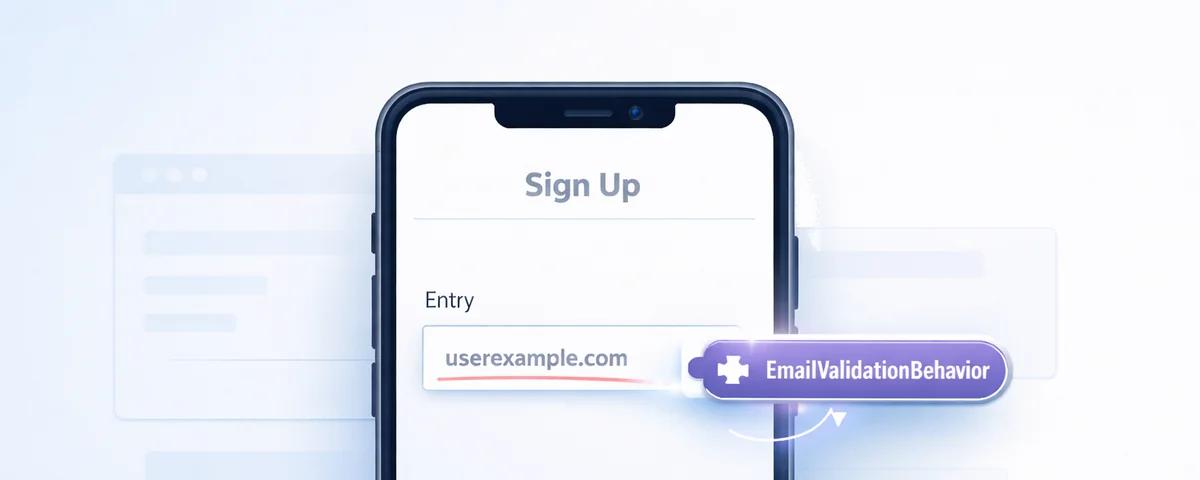
Think about Chrome extensions. You install a plugin, and suddenly your browser can block ads. The host application doesn't know how the plugin works internally, it just knows the plugin is there and benefits from what it does.
That's what Behaviors are in .NET MAUI: plugins for your UI controls. You attach a behavior to a control, and that control gains new abilities without knowing how they work. The behavior encapsulates the logic, and you can attach it to as many controls as you need.
Anatomy of a Behavior
Every behavior follows the same basic structure: attachment, logic, and cleanup.
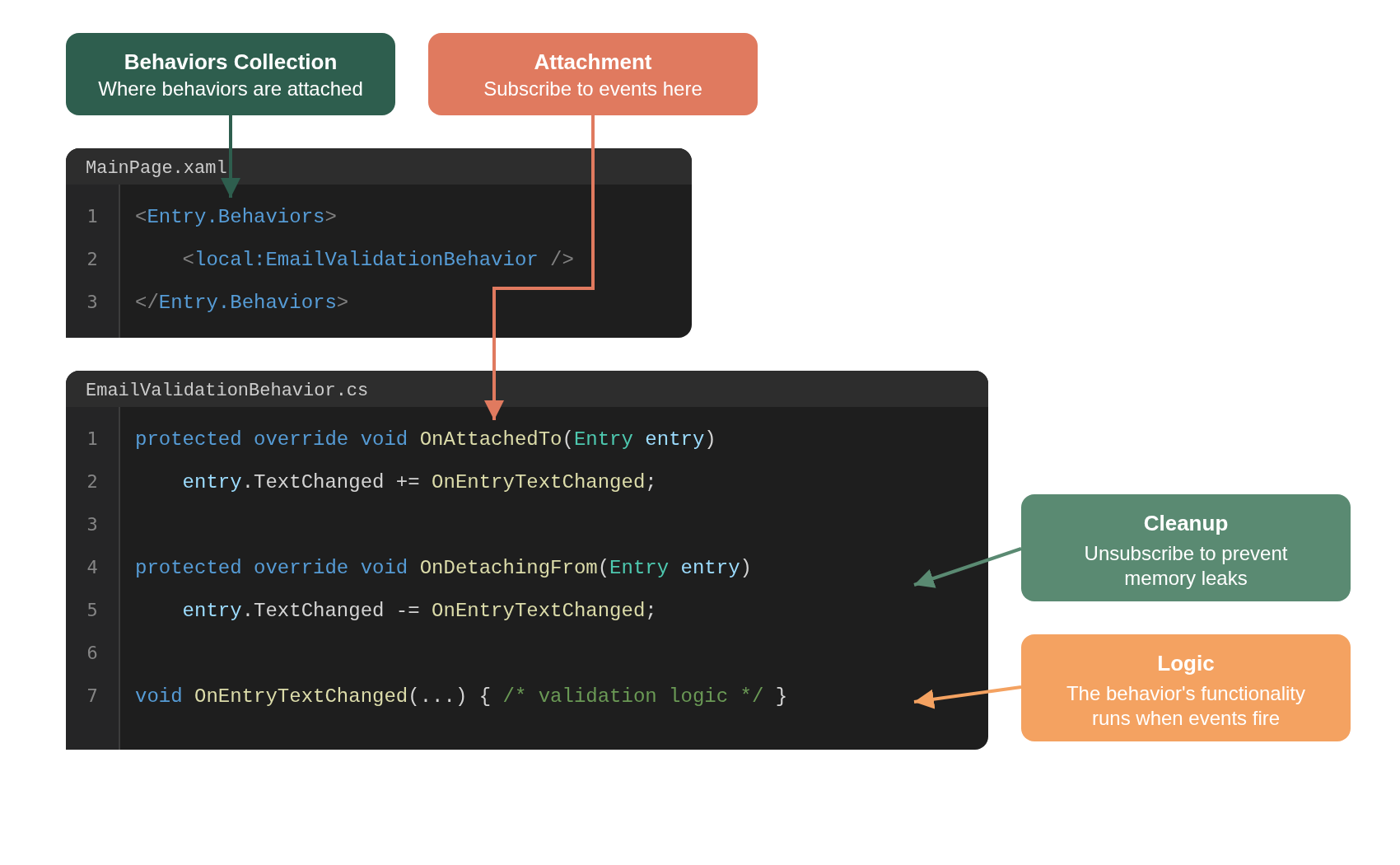
Behaviors collection. Every visual element has a Behaviors collection that is used to attach behavior classes to them from XAML or C#.
Attachment. When a behavior is added to a control, its OnAttachedTo method fires. This is where you subscribe to events or set up whatever the behavior needs.
Cleanup. When the behavior is removed, OnDetachingFrom fires. This is where you unsubscribe from events to prevent memory leaks.
Logic. The actual functionality of the behavior is isolated into its own private method to be able to use it to subscribe/unsubscribe to events.
Using Behaviors
Consider a common scenario: you have an Entry for email input, and you need to validate it. Following MVVM, you might approach it like this:
public class SignUpViewModel : BaseViewModel
{
    private string _email;
    public string Email
    {
        get => _email;
        set
        {
            _email = value;
            ValidateEmail();
        }
    }

    private Color _emailTextColor = Colors.Black;
    public Color EmailTextColor
    {
        get => _emailTextColor;
        set => _emailTextColor = value;
    }

    private void ValidateEmail()
    {
        var isValid = !string.IsNullOrWhiteSpace(Email) &&
                      Regex.IsMatch(Email, @"^[^@\s]+@[^@\s]+\.[^@\s]+$");
        EmailTextColor = isValid ? Colors.Black : Colors.Red;
    }
}<Entry Text="{Binding Email}"
TextColor="{Binding EmailTextColor}"
Placeholder="Enter your email" />It works, but what happens when you need the same validation logic in different buttons or different pages? Copy-paste? Create a base class? The first one breaks the Single Responsibility Principle (SRP) and the second opens the door to additional and unexpected side-effects to be added over time.
With a Behavior, the Entry handles its own validation without duplicating logic:
<Entry Placeholder="Enter your email">
    <Entry.Behaviors>
        <local:EmailValidationBehavior />
    </Entry.Behaviors>
</Entry>
By using behaviors we gain:
- Single responsibility principle - The ViewModel stays focused on business logic
- Testability - The validation logic is isolated in a single component and therefore easily testable
- Reusability - The same behavior can be attached to any
Entryin your app without extra configuration
Three Types of Behaviors
.NET MAUI provides three behavior types based on how they're implemented and what they can access.
Attached Behaviors
Attached Behaviors are static classes with an attached property that toggles the behavior on or off. They're the simplest form of behaviors.
public static class EmailValidationBehavior
{
    public static readonly BindableProperty AttachBehaviorProperty =
        BindableProperty.CreateAttached(
            "AttachBehavior",
            typeof(bool),
            typeof(EmailValidationBehavior),
            false,
            propertyChanged: OnAttachBehaviorChanged);

    public static bool GetAttachBehavior(BindableObject view) =>
        (bool)view.GetValue(AttachBehaviorProperty);

    public static void SetAttachBehavior(BindableObject view, bool value) =>
        view.SetValue(AttachBehaviorProperty, value);

    static void OnAttachBehaviorChanged(BindableObject view, object oldValue, object newValue)
    {
        if (view is not Entry entry) return;

        bool attachBehavior = (bool)newValue;
        if (attachBehavior)
            entry.TextChanged += OnEntryTextChanged;
        else
            entry.TextChanged -= OnEntryTextChanged;
    }

    static void OnEntryTextChanged(object sender, TextChangedEventArgs args)
    {
        if (sender is not Entry entry) return;

        bool isValid = !string.IsNullOrWhiteSpace(args.NewTextValue) &&
                       Regex.IsMatch(args.NewTextValue, @"^[^@\s]+@[^@\s]+\.[^@\s]+$");
        entry.TextColor = isValid ? Colors.Black : Colors.Red;
    }
}<Entry Placeholder="Enter your email"
local:EmailValidationBehavior.AttachBehavior="True" />When AttachBehavior is set to True, the OnAttachBehaviorChanged method fires and hooks up the validation. Set it to False and the behavior detaches.
Use Attached Behaviors when:
- You need something quick and stateless
- There's nothing to configure or state to evaluate
The limitation: Because they're static, Attached Behaviors can't have instance-specific configuration. Every control using the behavior gets identical functionality.
.NET MAUI Behaviors
.NET MAUI Behaviors inherit from Behavior<T> and provide instance-based behavior with full support for bindable properties. This is the standard choice for most scenarios.
public class EmailValidationBehavior : Behavior<Entry>
{
    public static readonly BindableProperty InvalidColorProperty =
        BindableProperty.Create(nameof(InvalidColor), typeof(Color),
            typeof(EmailValidationBehavior), Colors.Red);

    public Color InvalidColor
    {
        get => (Color)GetValue(InvalidColorProperty);
        set => SetValue(InvalidColorProperty, value);
    }

    public static readonly BindableProperty ValidColorProperty =
        BindableProperty.Create(nameof(ValidColor), typeof(Color),
            typeof(EmailValidationBehavior), Colors.Black);

    public Color ValidColor
    {
        get => (Color)GetValue(ValidColorProperty);
        set => SetValue(ValidColorProperty, value);
    }

    protected override void OnAttachedTo(Entry entry)
    {
        base.OnAttachedTo(entry);
        entry.TextChanged += OnEntryTextChanged;
    }

    protected override void OnDetachingFrom(Entry entry)
    {
        base.OnDetachingFrom(entry);
        entry.TextChanged -= OnEntryTextChanged;
    }

    void OnEntryTextChanged(object sender, TextChangedEventArgs args)
    {
        if (sender is not Entry entry) return;

        bool isValid = !string.IsNullOrWhiteSpace(args.NewTextValue) &&
                       Regex.IsMatch(args.NewTextValue, @"^[^@\s]+@[^@\s]+\.[^@\s]+$");
        entry.TextColor = isValid ? ValidColor : InvalidColor;
    }
}
Now each instance can be configured differently:
<Entry Placeholder="Work email">
    <Entry.Behaviors>
        <local:EmailValidationBehavior InvalidColor="Orange" ValidColor="Green" />
    </Entry.Behaviors>
</Entry>

<Entry Placeholder="Personal email">
    <Entry.Behaviors>
        <local:EmailValidationBehavior InvalidColor="Red" ValidColor="Blue" />
    </Entry.Behaviors>
</Entry>
The lifecycle is explicit: OnAttachedTo fires when the behavior connects, OnDetachingFrom when it's removed.
Use .NET MAUI Behaviors when:
- You need configurable properties
- Different instances need different settings
- You want to share behaviors through styles
Platform Behaviors
Platform Behaviors inherit from PlatformBehavior<TView, TPlatformView> and give you access to the native control underneath. Use these when you need functionality that doesn't exist at the cross-platform level.
Platform Behaviors are the .NET MAUI replacement for what Xamarin Effects were used for.
// Shared definition
namespace MyApp.Behaviors
{
    public partial class TintColorBehavior
    {
        public static readonly BindableProperty TintColorProperty =
            BindableProperty.Create(nameof(TintColor), typeof(Color),
                typeof(TintColorBehavior));

        public Color TintColor
        {
            get => (Color)GetValue(TintColorProperty);
            set => SetValue(TintColorProperty, value);
        }
    }
}// Android implementation (Platforms/Android/)
namespace MyApp.Behaviors
{
public partial class TintColorBehavior : PlatformBehavior<Image, ImageView>
{
protected override void OnAttachedTo(Image bindable, ImageView platformView)
{
base.OnAttachedTo(bindable, platformView);
if (TintColor is not null)
{
platformView.SetColorFilter(
new PorterDuffColorFilter(
TintColor.ToPlatform(),
PorterDuff.Mode.SrcIn));
}
}
protected override void OnDetachedFrom(Image bindable, ImageView platformView)
{
base.OnDetachedFrom(bindable, platformView);
platformView.ClearColorFilter();
}
}
}// iOS implementation (Platforms/iOS/)
namespace MyApp.Behaviors
{
public partial class TintColorBehavior : PlatformBehavior<Image, UIImageView>
{
protected override void OnAttachedTo(Image bindable, UIImageView platformView)
{
base.OnAttachedTo(bindable, platformView);
if (TintColor is not null)
platformView.TintColor = TintColor.ToPlatform();
}
protected override void OnDetachedFrom(Image bindable, UIImageView platformView)
{
base.OnDetachedFrom(bindable, platformView);
platformView.TintColor = null;
}
}
}Use Platform Behaviors when:
- You need access to native platform APIs
- You're migrating Effects from Xamarin.Forms
Making Them Reusable Through Styles
Behaviors can be applied through styles, but there's a catch: the Behaviors collection is read-only. The workaround is adding an attached property that controls whether the behavior gets applied:
public class NumericValidationBehavior : Behavior<Entry>
{
    public static readonly BindableProperty AttachBehaviorProperty =
        BindableProperty.CreateAttached(
            "AttachBehavior",
            typeof(bool),
            typeof(NumericValidationBehavior),
            false,
            propertyChanged: OnAttachBehaviorChanged);

    public static bool GetAttachBehavior(BindableObject view) =>
        (bool)view.GetValue(AttachBehaviorProperty);

    public static void SetAttachBehavior(BindableObject view, bool value) =>
        view.SetValue(AttachBehaviorProperty, value);

    static void OnAttachBehaviorChanged(BindableObject view, object oldValue, object newValue)
    {
        if (view is not Entry entry) return;

        bool attachBehavior = (bool)newValue;
        if (attachBehavior)
            entry.Behaviors.Add(new NumericValidationBehavior());
        else
        {
            var toRemove = entry.Behaviors.FirstOrDefault(b => b is NumericValidationBehavior);
            if (toRemove != null)
                entry.Behaviors.Remove(toRemove);
        }
    }

    protected override void OnAttachedTo(Entry entry)
    {
        base.OnAttachedTo(entry);
        entry.TextChanged += OnEntryTextChanged;
    }

    protected override void OnDetachingFrom(Entry entry)
    {
        base.OnDetachingFrom(entry);
        entry.TextChanged -= OnEntryTextChanged;
    }

    void OnEntryTextChanged(object sender, TextChangedEventArgs args)
    {
        if (sender is not Entry entry) return;

        bool isValid = double.TryParse(args.NewTextValue, out _);
        entry.TextColor = isValid ? Colors.Black : Colors.Red;
    }
}
Now you can define a style that automatically attaches the behavior:
<Style x:Key="NumericEntryStyle" TargetType="Entry">
    <Setter Property="Keyboard" Value="Numeric" />
    <Setter Property="local:NumericValidationBehavior.AttachBehavior" Value="True" />
</Style>

<Entry Style="{StaticResource NumericEntryStyle}" />
One definition, consistent behavior across your app.
Important: Notice that OnAttachBehaviorChanged creates a new instance of the behavior for each control. This is intentional. Behaviors that maintain state should never be shared between controls—each control needs its own instance to avoid unexpected side effects.Memory Management
Failing to unsubscribe from events, dispose of objects, or perform other required cleanup can cause memory leaks. Without proper cleanup, a single behavior can keep an entire page alive in memory long after the user navigated away. Multiply that by dozens of controls across your app, and you have a serious problem.
The cleanup strategy differs between behavior types:
.NET MAUI Behaviors
.NET MAUI Behaviors have explicit lifecycle methods. Always unsubscribe in OnDetachingFrom what you subscribed in OnAttachedTo:
protected override void OnAttachedTo(Entry entry)
{
    base.OnAttachedTo(entry);
    entry.TextChanged += OnEntryTextChanged;
}

protected override void OnDetachingFrom(Entry entry)
{
    entry.TextChanged -= OnEntryTextChanged;
    base.OnDetachingFrom(entry);
}Important:OnDetachingFromisn't automatically called when pages are popped from navigation. You may need to manually clear theBehaviorscollection when a page is destroyed.
Attached Behaviors
Attached Behaviors don't have OnDetachingFrom. The propertyChanged delegate only fires when someone explicitly sets AttachBehavior to false which rarely happens during normal navigation.
The solution is to hook into the control's Unloaded event as a safety net:
static void OnAttachBehaviorChanged(BindableObject view, object oldValue, object newValue)
{
    if (view is not Entry entry) return;

    if ((bool)newValue)
    {
        entry.TextChanged += OnEntryTextChanged;
        entry.Unloaded += OnEntryUnloaded;
    }
    else
    {
        Detach(entry);
    }
}

static void OnEntryUnloaded(object sender, EventArgs e)
{
    if (sender is Entry entry)
        Detach(entry);
}

static void Detach(Entry entry)
{
    entry.TextChanged -= OnEntryTextChanged;
    entry.Unloaded -= OnEntryUnloaded;
}
This ensures cleanup happens when the control leaves the visual tree, regardless of whether anyone remembered to set AttachBehavior back to false.
Quick Reference
| Do | Don't |
|---|---|
Unsubscribe in OnDetachingFrom everything you subscribed in OnAttachedTo | Assume the framework handles cleanup for you |
Call base.OnAttachedTo() and base.OnDetachingFrom() | Skip the base calls |
Use Unloaded event for Attached Behavior cleanup | Rely on AttachBehavior being set to false |
| Create new behavior instances when using styles | Share stateful behavior instances between controls |
Summary
Behaviors are plugins for your UI controls. You attach them, and the control gains new abilities without knowing how they work.
- Attached Behaviors are quick and stateless
- .NET MAUI Behaviors offer configuration through bindable properties
- Platform Behaviors give you access to native APIs when cross-platform isn't enough
The value is separation of concerns: your controls stay focused on display, your ViewModels stay focused on business logic, and reusable functionality lives in self-contained, testable behaviors.